

When using the SEPPmail Secure E-Mail Gateway for transparent email encryption, administrators occasionally encounter a frustrating phenomenon: recipients receiving unreadable emails, attachments named winmail.dat, or broken calendar entries.
The root cause although is usually not the gateway itself. Instead, it lies in the use of a Microsoft proprietary: Rich Text Format (RTF) and its transport mechanism, TNEF.
The problem: When Outlook is “too smart”
Microsoft Outlook typically uses three formats: HTML, Plain Text, and Rich Text Format (RTF). The issue is that RTF is not an internet standard. To transmit formatting, attachments, or special Outlook features (like voting buttons or meeting details), Microsoft wraps the message in a binary container called TNEF (Transport Neutral Encapsulation Format).
When such an email leaves your environment and hits a system that cannot work with TNEF – such as the SEPPmail Gateway or external mail clients like Gmail or Thunderbird – several things can happen:
- The message body may appear as unreadable plain text.
- The actual content and attachments are bundled into a single file named
winmail.dat. - SEPPmail Impact: Since the gateway cannot natively parse a binary TNEF structure when it needs to encrypt or sign the mail, the recipient often receives corrupted data or broken calendar invitations.
SEPPmail behaviour and calendar issues
According to the official SEPPmail documentation, receiving RTF/TNEF data is a primary reason why calendar entries arrive broken on the recipient’s side. SEPPmail handles standard HTML or Plain Text perfectly. If Exchange is embedding the mail in TNEF before it reaches the gateway, SEPPmail cannot properly process the internal structure of the message, leading to synchronisation errors or missing details in meeting requests.
Most SEPPmail administrators disable email encryption of such messages since encryption breaks the messages. You can find this setting on the SEPPmail WebAdmin GUI under “Mail Processing” – “Ruleset generator” – “Encryption” – “Exclude calendar entries and RTF mails (winmail.dat)”
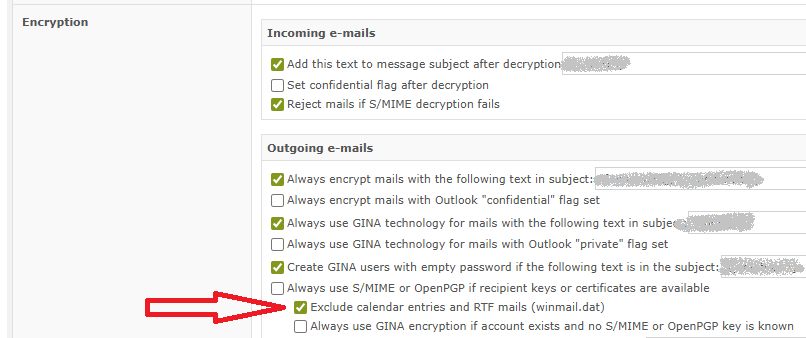
If this option is enabled and an email message is containing RTF content, you can see the following log message entries:
[...]
Jan 01 00:00:01 Message Content contains RTF-formatted MIME parts
Jan 01 00:00:02 Message has 1 attachment(s)
Jan 01 00:00:03 1. attachment: name=winmail.dat, mime-type=application/ms-tnef, size=1234
[...]
Jan 01 00:00:04 Calendar entry could not be found, but detected RTF-formatted MIME parts
Jan 01 00:00:05 Cannot sign: incompatible mail format
[...]
So as soon as there is RTF content in the message, the message is not manipulated from the SEPPmail system.
The solution: Disabling TNEF globally
To resolve this permanently, you must instruct Exchange (or Exchange Online) never to send RTF/TNEF to external domains. While Microsoft allows users to change these settings in Outlook, those settings are unreliable and difficult for end-users to manage.
The cleanest solution is to configure this at the server level via Remote Domains. This ensures that Exchange converts all outgoing messages into standard-compliant HTML or Plain Text before they are handed off to the SEPPmail Gateway.
The PowerShell command
Open the Exchange Management Shell (or connect to Exchange Online PowerShell) and execute the following:
Set-RemoteDomain -Identity Default -TNEFEnabled $falseWhat does this do?
- Set-RemoteDomain Default: Applies the setting to all external recipients (assuming
*is your default). - -TNEFEnabled $false: This forces Exchange to convert TNEF content into standard MIME (HTML/Text). The dreaded
winmail.datdisappears, and SEPPmail can cleanly process and encrypt the email, including calendar attachments.
Conclusion
In modern email infrastructure, especially when encrypting emails, Rich Text Format has no justification anymore outside of your internal organisation. By disabling TNEF on the Exchange server, you eliminate the winmail.dat issue for all external recipients and ensure your SEPPmail Gateway can handle the emails flawlessly.
Information sources
https://docs.seppmail.com/ch/09_ht_general_calendar-entries-broken-at-recipient-side.html?q=tnef
