

Last updated: 15.06.2026
In the past few days, multiple of our resellers have reported issues where DNS resolution using the default Fortinet FortiGuard DNS servers (96.45.45.45 & 96.45.46.46) is not functioning as expected with DNS over TLS (DoT) on TCP/853.
Fortinet is aware about this problem and has documented this issue under bug ID 1298350. Affected Versions are v7.4.10, v7.4.11, and v7.4.12.
Solution
Upgrading from FortiOS 7.4.x to FortiOS 7.6.7 was reported to solve the issue. Please let us know in the comments, if this solved the issue in your case also.
Workaround
BOLL Recommended Workaround
Another possible workaround is to switch to a custom DNS provider, such as your ISP’s DNS servers or a trusted public DNS resolver. To ensure your DNS queries are encrypted in transit, configure the resolver to use DNS over TLS (DoT); otherwise, standard DNS traffic is typically sent unencrypted and could be observed or modified by intermediaries on the network.
Fortinet TAC Support Workaround 1
Fortinet has confirmed that this is a known issue affecting certain FortiOS 7.4.x releases when DNS over TLS (DoT) is enabled. As a temporary workaround, they recommend switching DNS communication to cleartext mode:
config system dns
set protocol cleartext
end
Fortinet TAC Support Workaround 2
Fortinet has access to an interim build (Build number 9218) of FortiOS 7.4.12, that solves the issue in FortiOS 7.4.12. To get access to this interim build, you need to open a case at the Fortinet support.
This issue should be fixed in future FortiOS release 7.4.13.
Fortinet TAC Support Workaround 3
- Check the CA bundle DB version. If it’s 1.00064, then import root-ca-DigiCert-High-Assurance-EV.crt to your trusted CA certs.
fgt01# diagnose autoupdate versions | grep "Certificate Bundle" -A 2

Certificate Bundle
---------
Version: 1.00064
2. Is it still does not work, add the following config:
config system dns-database
    edit "1"
        set domain "digicert.com"
        config dns-entry
            edit 1
                set hostname "ocsp"
                set ip 23.11.32.159
            next
        end
    next
end
Important Note on DNS over TLS (DoT)
If you are using custom DNS servers with DNS over TLS enabled, be aware of a common configuration pitfall: the server hostname must match the SSL certificate presented by the DNS provider.
If the hostname does not match the certificate, TLS negotiation will fail, and DNS resolution will not work. This issue often appears when using an IP address instead of a proper DNS name for the DoT server.
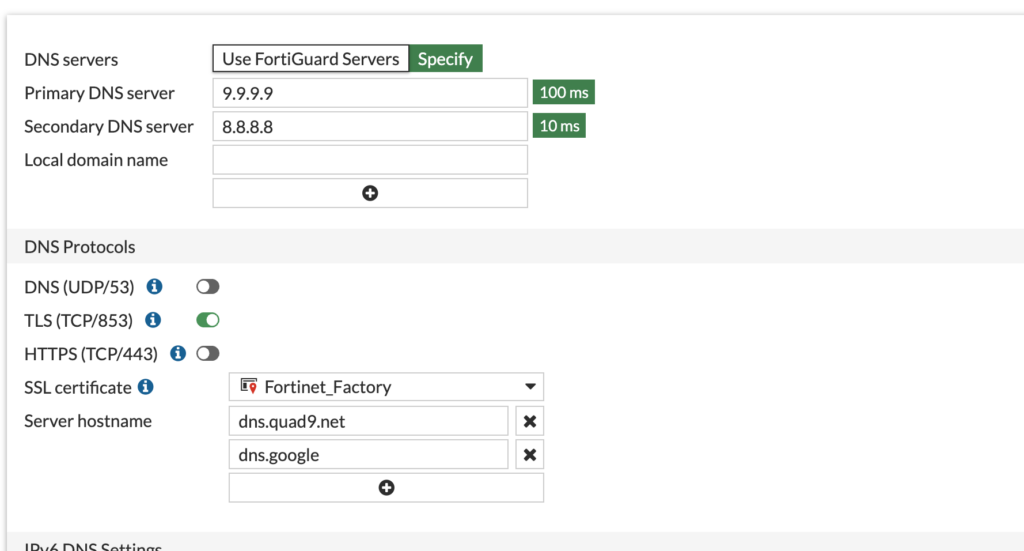
Use the correct DNS name of the DNS Servers.
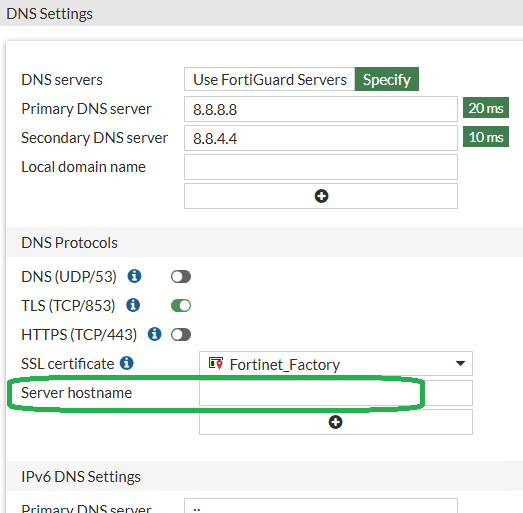
Or remove the DNS Server Hostname check by leaving the field empty.
For more technical details and guidance, refer to the official Fortinet technical note:
FortiGate Technical Tip: DNS server is unreachable when using custom DNS – Fortinet Community
DNS over TLS not working on FortiOS v7.4.10/v7.4.11/v7.4.12 – Fortinet KB
Release Notes 7.4.12 – Fortinet Docs
If using public DNS with DoT, refer to:
DNS over TLS (DoT) with 3rd Party Global DNS (Google DNS) – Fortinet KB
Using Cloudflare DNS with DNS over TLS showing as unreachable – Fortinet KB

Danke für den ausführlichen Beitrag, der hat mir bei der Eingrenzung des Problems geholfen.
Ich kann eure Solution-Angabe bestätigen: Bei mir waren eine FortiGate VM sowie eine FortiGate 120G betroffen, beide mit aktivem DNS over TLS auf die FortiGuard Default Server (96.45.45.45 / 96.45.46.46). Die Server wurden als unreachable gemeldet, obwohl die Internetverbindung selbst einwandfrei war.
Ich habe beide Systeme auf FortiOS 7.6.7 geupdatet. Seither scheint das Problem behoben, die Namensauflösung über DoT läuft auf beiden Geräten wieder stabil. Ich beobachte es noch ein paar Tage weiter, aber bis jetzt sind keine Aussetzer mehr aufgetreten.
Hallo Christian
vielen Dank für dein Feedback und die Bestätigung.
Grüsse
Fabian