

Introduction
Over the past few FortiOS releases, Fortinet has gradually restricted SSL VPN functionality and completely removed it from certain FortiGate models. The following models and firmware versions are affected:
- G-series entry-level models (50G, 70G, 90G) will no longer support SSL VPN (web and tunnel mode) starting with FortiOS 7.4.8.
- FortiGate models with 2 GB of RAM (40F, 60F) will no longer support SSL VPN (web and tunnel mode) starting with FortiOS 7.6.
- FortiOS 7.6.3 and later:
- SSL VPN tunnel mode is completely unsupported and has been removed across all FortiGate models.
- SSL VPN web mode has been renamed to “Agentless VPN”, but is not supported on the 40F, 60F, 70G and 90G series models.
(https://docs.fortinet.com/document/fortigate/7.6.4/fortios-release-notes/877104)
For many existing installations, this means that an SSL VPN solution currently in use will eventually have to be replaced with an IPsec VPN. However, this is not simply a matter of replacing one configuration with another. SSL VPN and IPsec VPN differ significantly in how they work and in the features and capabilities they provide. As a result, migrating from SSL VPN to IPsec often requires a fundamentally different VPN design.
Fortunately, the timeline for such a migration has become somewhat less pressing, as Fortinet has pushed back the End of Engineering Support (EOES) dates for FortiOS 7.4 and 7.6 by one year. The current dates are:
| Version | End of Engineering Support (EOES) | End of Support (EOS) |
|---|---|---|
| 7.2 | 31 March 2025 | 30 September 2026 (LTS: 31 March 2028) |
| 7.4 | 11 May 2027 | 11 November 2028 |
| 7.6 | 25 July 2028 | 25 January 2030 (LTS: 29 July 2031) |
This article focuses on the migration from SSL VPN to IPsec VPN using FortiClient as the client-side VPN solution. It’s explicitly not intended to be a step-by-step guide for migrating from SSL VPN to IPsec. Instead, we want to shed some light on what has become a rather confusing topic due to the numerous changes, different FortiOS versions, and, last but not least, various bugs and implementation-specific quirks.
To achieve this, we will discuss various design considerations, provide additional hints and background information, and point to further documentation and useful resources. The goal is to provide a better understanding of the aspects that should be considered when designing an IPsec VPN as a replacement for an existing SSL VPN environment.
The focus of this article is on FortiOS 7.4/7.6/8.0 and IKEv2. FortiOS 7.2 and IKEv1 is not considered.
Design Considerations
Which FortiClient Version Should I Choose?
Supported features vary depending on the operating system and the FortiClient licensing model.
Supported platforms:
- Windows
- macOS
- Linux
- Mobile platforms (Android/iOS)
Before selecting a FortiClient version, review the required features and confirm whether a FortiClient EMS license is needed.
Summary
| Aspect | Free VPN-Only (7.4.3) | Full FortiClient (7.4.4+ / 8.0.0) | FortiClient Standalone (7.4.7+) |
| IKEv1 | Supported | Not supported | Not supported |
| IKEv2 | Supported | Supported (only option) | Supported (only option) |
| Updates | Frozen at 7.4.3 | Actively Updated | Actively updated |
| Central Management (EMS) | Not available | Available | Not required |
| Technical Support | No support | Full TAC Support | Limited (email only) |
| Advanced Features | Limited | Full feature set | Limited basic features |
| Licensing | Free | EMS license required | Token-based (FIC) |
| LDAP+Fortitoken | no support, requires 7.4.4 | supported in 7.4.4 | supported |
| DNS Suffix | only with IKEv1 | supported with IKEv2 | supported with IKEv2 |
FortiClient VPN-only
- Latest available free version: FortiClient 7.4.3
- Includes only basic VPN functionality:
- IPsec VPN (Not Linux)
- SSL VPN
- Feature limitations compared to licensed versions
- LDAP and Fortitoken MFA, needs 7.4.4 at least which is licensed client, you can not get 7.4.4 with free client.
- Linux: Free client only supports SSL-VPN
- No active support, TAC assistance, or future updates planned at the moment
- Certain Features like Network-ID and EAP-Mode have to be configured in the XML config file.
- Suitable for basic remote access requirements without central management, every client has to be configured on the machine itself, no easy updates to vpn tunnel configurations
FortiClient EMS License (recommended for managed environments)
- Provides centralized endpoint management through FortiClient EMS
- Allows administrators to manage endpoint profiles and security policies centrally:
- Remote access VPN profiles
- Web filtering
- Antivirus / Endpoint Protection Platform (EPP)
- Vulnerability scanning
- Compliance-based ZTNA access control
- Includes FortiCare/TAC support
- Available as:
- FortiClient EMS Cloud
- Cloud-hosted management platform
- No on-premises EMS infrastructure required
- FortiGate and FortiClient EMS Cloud must be linked to the same FortiCloud account
- Licensed per user (minimum order quantity (MOQ): 25 users)
- FortiClient EMS On-Premises
- Self-hosted deployment
- Available as a pre-configured virtual appliance
- Licensed per user (minimum order quantity (MOQ): 25 users)
- FortiClient EMS Cloud
FortiClient Standalone License
- Alternative when FortiClient EMS (cloud or on-premises) is not desired.
- Provides FortiClient without endpoint management capabilities
- Available starting with FortiClient 7.4.7
- FortiIdentity Cloud (FIC) is used for user authentication and identity management through SAML-based Single Sign-On (SSO).
- Minimum order quantity (MOQ): 50 licenses, licensed per user
- Limitations:
- No centralized endpoint management
- Limited FortiCare/TAC support (email only): (https://docs.fortinet.com/document/forticlient/7.4.7/forticlient-standalone-user-guide/725845/introduction)
- IKEv2 enforced from FortiClient 7.4.4 onwards like with FortiClient EMS version
- For advanced VPN functionality, endpoint protection features, central management, and full TAC support, you need the full FortiClient EMS-based version
When should you choose FortiClient EMS?
Choose FortiClient EMS if you require:
- Central management of multiple endpoints
- Advanced security capabilities beyond VPN:
- EPP
- Vulnerability scanning
- Compliance enforcement
- ZTNA integration
- Full FortiCare/TAC support for troubleshooting and assistance
- You do not need to use every available feature. Select and configure the capabilities that meet your organization’s requirements.
- Certain features are only available with the ems version:
- VPN auto-connect/always-up.
- VPN before logon.
- On-net/off-net.
- Central management.
- Feedback options and diagnostic tools are under the help/info page.
- *.msi Packages for Domain GPO installations.
- New Features and Security Patches
- Further information: https://community.fortinet.com/forticlient-4/technical-tip-understanding-forticlient-licensing-features-and-support-across-different-versions-and-platforms-98055
Alternatives
- Operating system–built-in IPsec VPN clients can be used for basic VPN connectivity. On Windows, for example, authentication is limited to PSK- or certificate-based methods. EAP-based authentication (e.g., username and password) as well as FortiToken authentication are not supported.
- Other third-party VPN clients, such as TheGreenBow, strongSwan, etc., are also available as alternatives.
IKE Version: IKEv1 vs. IKEv2
When setting up a new IPsec tunnel, the first decision to make is which version of IKE (Internet Key Exchange) to use.
Although IKEv1 was widely used for many years, it is now considered outdated. The IETF officially deprecated IKEv1 in April 2023, mainly due to its reliance on legacy cryptographic algorithms and parameters. While IKEv1 can still be configured securely with modern algorithms such as AES-256, SHA-2, and Diffie-Hellman Group 19 or higher, it is gradually being phased out and will not be covered in detail here.
IKEv2, its successor, provides improved security, performance, and a more robust framework for key exchange and authentication. Features such as IKE fragmentation, NAT traversal (NAT-T), and Dead Peer Detection (DPD) are natively integrated. For new deployments, IKEv2 is therefore the preferred choice. It is also the only option if the tunnel needs to run over a TCP port.
There is, however, an administrative caveat with FortiOS 7.4: although IKEv2 is supported, the FortiOS VPN Wizard automatically creates IKEv1 tunnels. To configure an IKEv2 dial-up tunnel, the tunnel must first be converted to a custom tunnel and IKEv2 enabled under the Authentication settings. In addition, some important IKEv2 dial-up settings are only available through the CLI and are not exposed in the WebUI. This means that FortiOS 7.4 administrators need a few additional manual configuration steps. While this may make IKEv1 seem easier to configure, it is not the better choice for a new deployment in the long term.
Also please be aware that FortiClient >= 7.4.4 doesn’t support IKEv1 anymore.
Conclusion: for new deployments and future-proof designs, there is ultimately little reason to choose IKEv1. IKEv2 should be the preferred choice whenever possible.
Which Encryption & Authentication Algorithms should be used
Regardless of the IKE version chosen, the cryptographic algorithms used for encryption and authentication, as well as the Diffie-Hellman groups selected for key exchange, should be carefully evaluated to ensure an adequate level of security.
Encryption and authentication should use cryptographic algorithms providing at least a 256-bit security level where applicable. For encryption, AES-256-CBC should be considered the minimum, with AES-256-GCM preferred when using IKEv2.
Please note that offloading GCM algorithms requires a CP10, CP9/CP9XLite/CP9Lite, NP7/NP7Lite (SOC5), or NP6XLite (SOC4). Older FortiGate models (e.g., FG-800D, FG-900D, or FG-1000D) will need to perform GCM encryption and decryption in software on the CPU.
For integrity and authentication, at least SHA-256 should be used.
For Diffie-Hellman key exchange, Group 19 or higher is recommended.
The following algorithms and Diffie-Hellman groups should generally be avoided due to their outdated or insufficient security properties:
- Diffie-Hellman groups: 1, 2, 5
- Encryption: DES, 3DES
- Hash algorithms: MD5, SHA-1
Conclusion: use cryptographic algorithms providing at least a 256-bit key length and choose a DH group >= 19
IKE Protocol & Port
By default, IKE&IPsec use UDP/500 and ESP (IP protocol #50) – with NAT-T it’s UDP/500 and UDP/4500. But when migrating an SSL VPN tunnel to IPsec, the goal might be to have the IPsec tunnel use the same port as the SSL VPN tunnel (e.g. tcp/10443).
Please be aware that changing the protocol for IPsec from UDP to TCP is only possible for IKEv2.
Let’s take a look at how this can be configured.
FortiOS >=7.4.2 – CLI only
Starting with v7.4.2 you are able to encapsulate IKE packets into TCP or use a fallback from UDP to TCP if tunnel negotiation over UDP is not successful.
# Switching the port - be aware that this is a VDOM-/system-wide setting
config system settings
  set ike-port 500       (for UDP)
  set ike-tcp-port 13443 (for TCP)
end

# Switching the protocol
config vpn ipsec phase1-interface
  edit <name-of-dialup-tunnel>
    set ike-version 2
    set transport [udp|udp-fallback-tcp|tcp]
      udp                 Use UDP transport for IKE.
      udp-fallback-tcp    Use UDP transport for IKE, with fallback to TCP transport.
      tcp                 Use TCP transport for IKE.
    set fallback-tcp-threshold [1..300] (Timeout before IKE/IPsec traffic falls back to TCP, default 15 seconds).
  end
end
FortiOS 7.6
The behavior in version 7.6 is actually the same as in version 7.4. Only the CLI command for “udp-fallback-tcp” has been renamed to “auto”, and the WebUI now includes the option to set the transport mode to “auto”.
# Switching the port - be aware that this is a VDOM-/system-wide setting
config system settings
  set ike-port 500       (for UDP)
  set ike-tcp-port 13443 (for TCP)
end

# Switching the protocol
config vpn ipsec phase1-interface
  edit <name-of-dialup-tunnel>
    set ike-version 2
    set transport [udp|auto|tcp]
      udp    Use UDP transport for IKE.
      auto   Use UDP transport for IKE, with fallback to TCP transport.
      tcp    Use TCP transport for IKE.
    set auto-transport-threshold ...
  end
end
FortiOS 8.0
With FortiOS 8.0, this behavior has changed slightly. The default Transport Mode is now set to “auto”, allowing FortiOS to attempt the negotiation over UDP first and fall back to TCP if UDP is not available. Alternatively, the Transport Mode can be explicitly configured to “udp” if required. TCP is no longer available as a selectable option in FortiOS 8.0.
Unfortunately – changing the transport mode for dialup tunnels is not supported in 8.0.0 and 8.0.1. Hopefully, this will be possible again in a future patch release.
FortiClient Configuration:
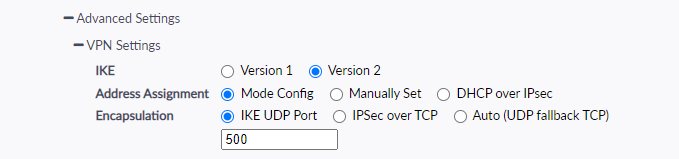
Transport mode is supported in FortiClient VPN-only 7.4.3 (since 7.4.1) and can be configured in the FortiClient GUI under Advanced Settings → VPN Settings → Encapsulation. No licensed version is required. https://docs.fortinet.com/document/fortigate/7.6.0/ssl-vpn-to-ipsec-vpn-migration/878694/tunneling-protocol-and-encapsulation
Pitfalls
- Please be aware that switching the transport mode from UDP to TCP will disable the NPU offloading on your Fortigate
- Also make sure that you do not create any port collisions when switching the ike-port or ike-tcp-port to a port which is used for something else (e.g. ike-saml-server).
Authentication
What needs to be considered when migrating from SSL VPN to IPsec VPN in terms of authentication? This depends on which authentication protocols are being used:
Authentication Protocols
Local User / Local Groups
Local users and groups that were used for SSL VPN can also be used for IPsec VPN without any changes. With IKEv1, user groups are used for XAUTH (Extended Authentication), while with IKEv2, they are used with EAP (Extensible Authentication Protocol).
EAP can be enabled in the FortiClient GUI by either configuring it to prompt for credentials at login or by saving the credentials.

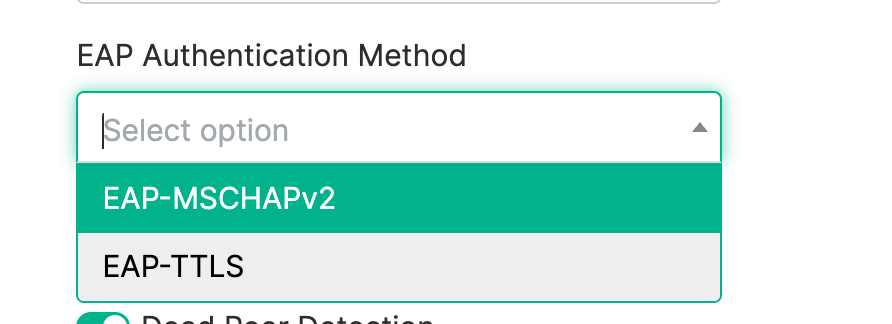
On the EMS server, EAP is enabled by default. You can choose between the available EAP protocols. See below for further information.
RADIUS
RADIUS groups can also be reused for IPsec VPN. With IKEv2, however, it is important to ensure that the RADIUS server in use supports EAP-MSCHAPv2.
This can be configured on the EMS server, as shown in the screenshot above.
For FortiClient Standalone and FortiClient VPN-only, this setting must be configured directly in the XML file:
<ike_settings>
 <eap_method>1</eap_method>
</ike_settings>
Technical Tip: How to enable EAP-TTLS for IPSec IKEv2 tunnels in VPN-only (unlicensed) FortiClient
LDAP
LDAP groups can also be reused for IPsec VPN authentication. However, when using IKEv2, FortiClient must use EAP-TTLS, which is supported only from FortiClient 7.4.3 onward. For the FortiClient VPN-only version, the EAP mode must be explicitly configured in the XML configuration.
This can be configured on the EMS server, as shown in the screenshot above.
For FortiClient Standalone and FortiClient VPN-only, this setting must be configured directly in the XML file:
<ike_settings>
 <eap_method>2</eap_method>
</ike_settings>
Technical Tip: How to enable EAP-TTLS for IPSec IKEv2 tunnels in VPN-only (unlicensed) FortiClient
SAML
As with SSL VPN, SAML can also be used for authentication with IPsec VPN. Officially, SAML authentication is supported for IKEv2 dial-up tunnels only. Our tests have shown that SAML authentication also works with IKEv1, but this configuration is not officially supported, so we cannot guarantee its behavior.
SAML authentication requires FortiOS 7.4 or later and FortiClient 7.2.4 or later.
The following additional configuration is required on FortiGate.
SAML authentication port for IKE (default = 1001).
config system global
    set auth-ike-saml-port <integer>
end
Starting with FortiOS 7.6.1, FortiGate can also listen for SAML authentication messages on the port defined in ike-tcp-port (more information: Using the same TCP port for IPsec SAML authentication and IKE TCP encapsulation in FortiOS v7.6.1). Anyway, if possible we would recommend to use different ports for ike-tcp-port and auth-ike-saml-port to prevent the authd daemon from accidentally processing IKE TCP packets and dropping them.
config system setting
    set ike-tcp-port <port listened by iked>
end
Next neccessary setting is the “ike-saml-server“. With this you specify on which interface the configured SAML server is listening. It’s important that the SAML server is configured on the interface that is the first point of contact for FortiClient traffic. If the clients connect via WAN1, choose the WAN1 interface. If your clients connect via a guest WLAN on your Fortigate you have to choose this wireless interface – even though dialup tunnel is configured on WAN1.
Up to now (valid for all FortiOS releases <= 8.0.0) only a single SAML server can be configured for dial-up IPsec VPNs.
config system interface
    edit <name>
        set ike-saml-server <saml_server>
    next
end
The certificate that is used for the SAML connection can be configured via WebUI: User & Authentication > Authentication Settings > Certificate or via CLI:
config user setting
     set auth-cert <certificate>
end
FortiClient configuration:
Saml can be enabled in FortiClient EMS under the Advanced Options. The IdP metadata fields must also be configured on the SP, which in this case is the FortiGate.
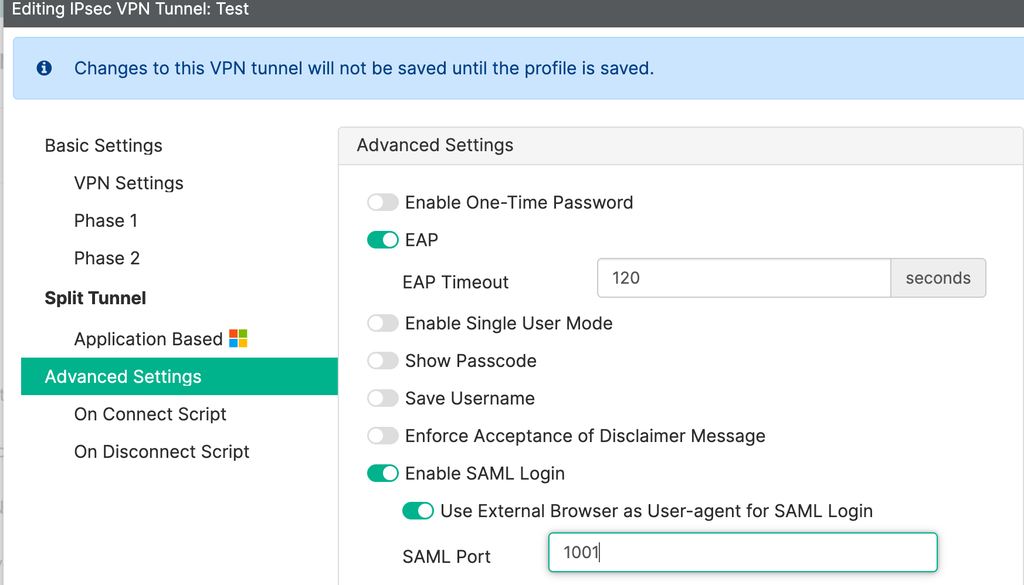
This can also be configured through the GUI in both FortiClient Standalone and FortiClient VPN-only.

Two-Factor Authentication
In principle, MFA is supported for dial-up VPNs. However, there are a few pitfalls to be aware of:
- Using LDAP Authentication & FortiToken: minimum requirements for this is FortiOS v7.4.9 (and later) and FortiClient Windows v7.4.4.
- Using RADIUS Authentication & FortiToken: Tested with FortiOS v7.6.7 and FortiClient VPN-only for Windows v7.4.3 using EAP-MSCHAPv2.
- Many additional information for other authentication protocols with MFA: Technical Tip: FortiOS IKEv2 dial-up VPN user and Multi-Factor Authentication resources
Multiple User Groups
If multiple user groups need to authenticate through an IKEv2 dial-up tunnel, we can distinguish between two scenarios:
One Dialup Tunnel for multiple user groups
In this scenario, not all user groups can be configured in Phase 1 of the tunnel. Therefore, the authusrgrp must be left empty in Phase 1, and the respective user groups must instead be configured in the corresponding firewall policies.
config vpn ipsec phase1-interface
  edit <vpn-name>
    set type dynamic
    set ike-version 2
    set eap enable
    set eap-identity send-request
    set authusrgrp ''
    ...
  next
end

config firewall policy
  edit <n>
   set srcintf "Dialup-Tunnel"
   set srcaddr "dialup-ip-range"
   set groups "local-group" "vpn-usergroup"
   ...
  next
end
In general: The authusrgrp should be configured either in the VPN phase1-interface or in the firewall policy — not in both.
One Dialup Tunnel per user group
If each user group is to use its own dial-up tunnel, multiple dial-up tunnels need to be configured on the FortiGate. If all users connect through the same WAN IP address, the FortiGate needs a way to distinguish between the different VPN requests and assign them to the correct tunnel.
With IKEv1, this was handled using Aggressive Mode and the Peer ID. With IKEv2, the distinction is made using Network Overlay and Network ID. Each tunnel and user group therefore needs its own unique Network ID.
Starting with FortiOS 7.6, this setting can be configured directly in the Web UI under VPN > VPN Tunnel > <dial-up-tunnel> > Authentication > Network Overlay. With FortiOS 7.4, however, the setting must still be configured via the CLI:
config vpn ipsec phase1-interface
  edit "Dialup-Tunnel"
    set type dynamic
    ...
    set network-overlay enable
    set network-id 10
  next
end
FortiClient Configuration:
The Network ID cannot be configured through the FortiClient VPN GUI, neither in the free nor in the licensed version.
For FortiClient installations managed through FortiClient EMS, the Network ID can be configured in the VPN tunnel configuration.
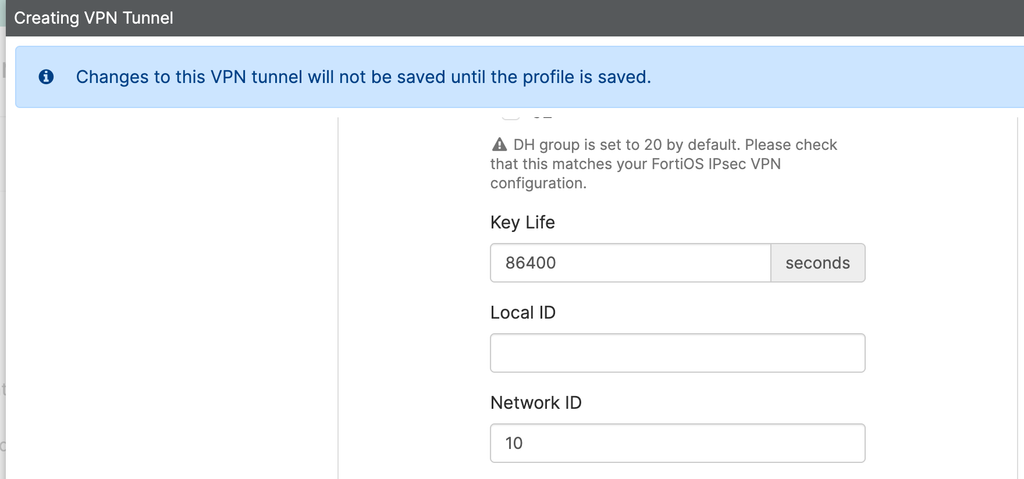
For FortiClient Standalone and FortiClient VPN-only, this configuration must be applied directly in the XML file:
<ike_settings>
    <networkid>10</networkid>
    <version>2</version>
</ike_settings>
Technical Tip: FortiClient support for multiple IKEv2 dialup tunnels at the same FortiGate remote gateway address
https://community.fortinet.com/fortigate-3/technical-tip-how-to-configure-network-id-for-distinguishing-ikev2-ipsec-vpn-tunnels-using-forticlient-xml-file-223272
DNS Suffix
DNS suffix configuration is natively supported for IKEv1, but only one DNS suffix is configurable per IPsec tunnel.
config vpn ipsec phase1-interface
    edit <name>
        set unity-support enable
        set domain <string>
    next
end
For IKEv2, DNS suffix is supported only starting with FortiOS v7.6.4, v8.0.0 and when connecting from a FortiClient running 7.4.4 or later. More than one DNS suffix can be configured per IPsec tunnel.
config vpn ipsec phase1-interface
    edit <tunnel_name>
        set mode-cfg enable
        set ike-version 2
        set type dynamic
        set dns-suffix-search <list of suffixes> # Specify one or more DNS suffixes in quotes separated by spaces
    next
endPitfalls
- Authusergroup conflict: Configure
authusergroupeither in the VPN phase1-interface or firewall policy — not both. - Proposal mismatch: FortiOS/FortiClient version differences can cause phase1/phase2 proposals from the VPN wizard to mismatch. Always verify and adjust manually.
- IKEv2 EAP not enabled: FortiOS 7.4 remote access wizard creates IKEv1 VPNs by default. Changing to IKEv2 alone is insufficient; EAP must also be enabled.
- Incorrect EAP mode in FortiClient: For EAP-TTLS or EAP-MSCHAPv2, FortiClient must be configured accordingly. Without an EMS license, this requires manual XML configuration (unsupported).
- Multiple dial-up tunnels: You need to configure a
peerid(IKEv1) ornetwork-id(IKEv2) when using multiple IPsec tunnels; otherwise, the tunnels can not be uniquely identified.
Troubleshooting
What can you do if everything is configured correctly, but the dial-up tunnel still fails to establish? Real-time debugging can help trace and analyze the individual steps of the negotiation and communication process.
Troubleshooting IKEv1 & IKEv2
# diagnose debug enable
# diagnose vpn ike log filter rem-addr4 x.x.x.x - where x.x.x.x is the public IP of the client
# diagnose debug application ike 63
(try to reconnect and wait for output)
(to disable the output)
# diagnose debug application ike 0
# diagnose debug disable
Troubleshooting Authentication
Troubleshooting command depends on the used authentication protocol:
- eap_proxy: EAP
- samld: SAML
- fnbamd: LDAP, Radius, TACACS, certificate validation
# diagnose debug enable
# diagnose debug application eap_proxy/samld/fnbamd -1
(try to reconnect and wait for output)
(to disable the output)
# diagnose debug application eap_proxy/saml/fnbamd 0
# diagnose debug disable
Summary
With SSL VPN tunnel mode ultimately removed in FortiOS 7.6.3 and later, migrating existing remote-access VPN deployments to IPsec VPN has become an important consideration for FortiGate administrators. However, replacing SSL VPN with IPsec is not a straightforward configuration change and requires careful planning around client compatibility, authentication, encryption, and network design.
The key recommendations and considerations are:
- Use IKEv2 for new deployments. It offers improved security and functionality and is the only IKE version supported by FortiClient 7.4.4 and later.
- Choose the appropriate FortiClient licensing model. The free VPN-only client is suitable for basic requirements but has significant limitations, including no centralized management, no ongoing updates beyond version 7.4.3, and limited authentication options. FortiClient EMS is recommended for managed environments requiring advanced features and full technical support. FortiClient Standalone is an alternative when centralized endpoint management is not required.
- Use modern cryptographic algorithms. Prefer AES-256-GCM where supported, SHA-256 or stronger for integrity, and Diffie-Hellman Group 19 or higher.
- Evaluate transport requirements. IPsec normally uses UDP ports 500 and 4500. IKEv2 can also support TCP encapsulation or UDP-to-TCP fallback on supported FortiOS versions, which may help in restrictive network environments. TCP encapsulation disables NPU offloading.
- Review authentication compatibility before migrating. Local users, RADIUS, LDAP, SAML, and MFA can be used in IPsec VPN deployments, but support depends on the FortiOS and FortiClient versions, the authentication method, and the client licensing model.
- Account for implementation-specific limitations. Important considerations include EAP configuration, multiple user groups and dial-up tunnels, Network ID, DNS suffix support, and differences between FortiOS releases.
- Validate the complete configuration. VPN proposals, authentication settings, firewall policies, client profiles, and version-specific behavior should be tested before deploying the replacement solution.
